Winning recruiters back from Excel
Apli's recruiters kept a foot in two systems: the automation platform built to run their hiring process, and the Excel sheet they trusted to actually get through it. This case study covers the research that explained why — and the resulting redesign, Comprehensive View, a table-based rework of Apli's candidate and position screens built to close that gap.

Client
Apli
Industry
Enterprise HR Solutions
Year
2024
Role
Lead UX Designer
Skills
User Research Information Architecture Product Strategy UX/UI
The Problem:
Apli's pitch was automation: let the chatbot source, screen, and schedule candidates so recruiters could just show up and hire. In practice, many enterprise clients — HEB, BBVA, Bimbo, Miniso, Colgate, and Coca-Cola's bottlers — weren't fully living inside the app. They'd check on a requisition, then go back to spreadsheets to run their actual process.
Going in, we had a working list of suspected pain points from CSM conversations:
Not enough candidates in the pipeline (sourcing/integration gaps)
Manual, repetitive posting and outreach
Difficulty moving candidates through the process — "too many clicks"
A pull toward Excel nobody could fully explain
The Excel pull stood out: flagged as the highest-impact, least-understood problem on the list. Was it about control, visibility, or habit? That question is what the research was built to answer.


Research & Insights
Working under the mentorship of an external senior UX researcher, we used a Jobs to Be Done approach — understanding the job recruiters were hiring a tool to do, rather than asking what they thought of features. We interviewed selection and recruitment leads across seven companies: 36 participants, 698 recorded minutes by the first readout, deliberately balanced between engaged users and disengaged ones rather than defaulting to whoever was easiest to schedule.
A first-impressions workshop surfaced five patterns ahead of full coded analysis, framed as hypotheses rather than conclusions:
A black box. Most recruiters only ever saw "approved" or "rejected," with no visibility into why.
Assist vs. decide. Recruiters wanted support, not decisions made for them — especially on scheduling, filtering, and comparing candidates.
Process needed room to shift. Role requirements changed after kickoff, and updating a flow in Apli felt slow.
One-size-fits-all didn't hold. Education, tech access, and role type all changed what a good candidate experience looked like.
One node in a bigger system. The real process lived in Excel — used to resurface past candidates, view many at once, blacklist, and remember.
Recruiters weren't rejecting automation — they were rejecting the loss of control that came with it. Excel wasn't the competition; it was the workaround for what Apli didn't give them.


The Process
Translating "recruiters prefer Excel for control" into a design problem meant asking: what would it take for Apli to give recruiters that same control, without asking them to leave the app? The answer was Comprehensive View — a table-based way of working with candidates and positions, sitting alongside Apli's existing list view rather than replacing it.
Information architecture. Columns split into two tiers — general fields common to every position at a company, and position-specific fields configured per role — so a single table stayed usable across very different job postings.
Candidates. Recruiters could toggle between the profile view and a table view without losing their place, opening a full profile from any row.
Show/hide columns to trim the table to what mattered that day
Filter and sort on any column, including compound filters
Export to CSV or Excel from the filtered view — recruiters still needed Excel for back-office work and reporting, so the goal was to complement that workflow, not compete with it
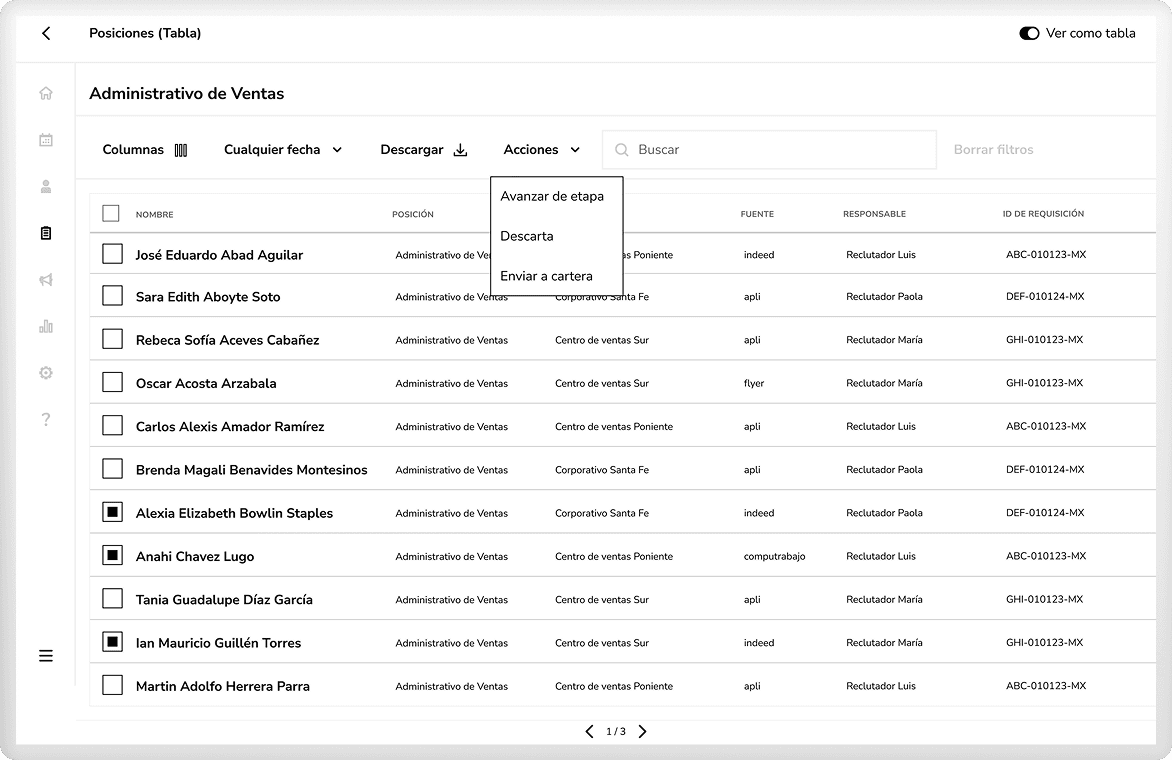
Positions. The table also had to move candidates through the hiring funnel — Registration → Screening → Assessments → Interviews → Documents → Validations → Hired — without reviving the "too many clicks" complaint.
Multi-select actions — advance, discard, or move to portfolio — applied to several candidates at once
Confirmation modals on every bulk action, naming the consequence plainly and requiring explicit acknowledgment
Success feedback after each action, so batch work always felt registered
Each decision maps to a finding: columns answer the "black box," filtering answers the need for control, confirmed bulk actions answer both "too many clicks" and "don't decide for me," and export meets the Excel habit on its own terms.

Outcome
By the time I left Apli, Comprehensive View was a fully mapped and engineering-ready set of flows for both Candidates and Positions.
It shipped shortly after I left. Apli's CPO wrote to me directly:
"Even though you're not around to see it, congrats on the great work."
Early recruiter feedback echoed the research directly — one recruiter put it simply:
"It's wonderful. I don't lose track of candidates anymore like I used to."
Impact & Learnings
Without being there for launch, I can't point to adoption numbers or a full before/after — just the signal above. Still, a few things stuck with me:
"I prefer Excel" is a symptom, not the finding. The real job was control and visibility. Bridging to that habit through the export flow was more useful than fighting it.
Confirmation builds trust, when it's specific. Naming the real consequence in each modal, instead of a generic "are you sure," is what made bulk actions feel like the recruiter's decision, not the system's.
Fast, honest synthesis builds stakeholder trust early. Framing first impressions as hypotheses, not conclusions, let the team start reacting weeks before full analysis was ready.
Owning research, product, and design end-to-end shows where a project is fragile. A clean handoff on paper doesn't guarantee execution, which is why I'd now document decisions as if someone else has to carry the project without me. That's exactly what happened here.